Welcome to Inkbunny...
Allowed ratings
To view member-only content, block by keyword, comment or upload, create an account. ( Hide )
Tutorial Preview - Preliminary Sketch
« older newer »
Nick7C5
Nick7C5's Scraps (9)

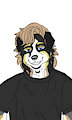
Tutorial - Part #1 - From a Hand-Drawn Sketch - Step 1

Tutorial - Part #2 - Details

Medium (920px wide max)
Wide - use max window width - scroll to see page ⇅
Fit all of image in window
set default image size: small | medium | wide
page 1
page 2
page 3
by Nick7C5
Tutorial Preview - Preliminary Sketch
Tutorial - Part #2 - Details
+6
" I hope I didn’t miss anything. Somewhere halfway through the process I figured… hey, this could actually be a tutorial.


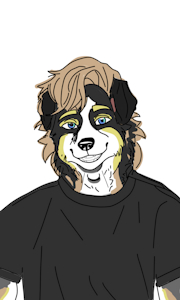
This is the first part based on the previously posted sketch, which will serve as the init image (I’m attaching it here as well):
Tutorial Preview - Preliminary Sketch by Nick7C5


Order:
" In this series I keep everything sorted from newest to oldest. After each image I include the infotext file I used to generate that specific img2img result.


Do you have any suggestions? Let me know in the comments! Feel free to send me private messages, too—I'd love to get to know you.

_______________


1. A lot of artists working with drawing tablets use photos to capture the key traits of a character. Since generating an automatic lineart from a real photo turned out to be a no‑go — moderation didn’t allow it — I decided to just draw it by hand. 😋

Before sketching, you can use the step I mentioned earlier: generate a clean lineart in stable diffusion from a photo, and then hand‑draw your own version based on that output. It’s a great way to learn how to sketch different things. It also helps keep the proportions in check — which means you don’t need high denoising and you can preserve the original composition without the model reshaping everything. Honestly, this would be way easier if I had a tablet instead of doing all this with a mouse… 🙄

It’s worth keeping in mind the size and proportions related to the character’s gender. For example, I noticed that making the eyes too big makes the model interpret the character as very young or female. A nose that’s too small, or longer hair, also pushes it in that direction. It’s a good idea to specify the exact gender in the prompt and add the opposite one in the negatives. Still, the model sometimes stubbornly tries to make the character look transsexual. 😉

ℹ️ One more thing about filling areas with color: the model looks for patterns in the noise. If you give it a perfectly flat color, it might struggle to find details in it and won’t draw anything on top. Sketches naturally have uneven fills, even outside the contour — and that’s actually good noise for the model. You don’t need to draw precisely or have any special talent for it.

" I’m listing the most important parameters first, and later I only mention the ones that changed.


🤣 I keep ending up with femboys… Haha! 🤣

" Model: furryLineartXl_v30
Sampler: Euler
CFG scale: 4.5
Steps: 24
Denoising: 0.5
Scale: 0.5
Output file: 00137-3736021098

Keywords
male 1,299,456, anthro 256,798, dog 189,599, gay 161,368, solo 127,403, sketch 68,989, ai generated 39,155, adult 35,512, anthropomorphic 32,904, sfw 32,707, blue eyes 20,252, white fur 19,147, long hair 16,183, solo male 10,016, stable diffusion 9,363, wip 6,486, blonde hair 6,469, border collie 5,467, ai generated art 5,110, anthrofurry 3,419, black nose 3,409, sfw art 2,264, tshirt 1,123, dog boy 766, sable 646, longhair 612, tutorial 601, bordercollie 462, dogboy 331, blondehair 209, sable border collie 17, sablebordercollie 16, sable fur 16, solo art 10
Details
Type: Picture/Pinup
Published: 1 month ago
Rating: General

MD5 Hash for Page 1... Show Find Identical Posts [?]
Stats
25 views
2 favorites
0 comments

BBCode Tags Show [?]
 
New Comment:
Move reply box to top
Log in or create an account to comment.