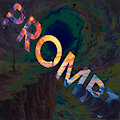
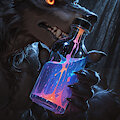
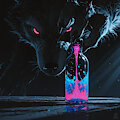
and their splatter background image set. Got infatuated with those images and just had to try and play a little with splatter concept in the prompt.
Second: I know i have been sleeping on tips and tricks, so i included a small example here of upscaler detail modding. When i transitioned from A1111 to ComfyUI the thing that bothered me the most was that comfyUI has no built in hiresfix/upscaler which would have added that kick of detail to the upscaled image you can observe in A1111. Trying to resolve this sent me down a rabbithole of letting the same image go through multiple k-samplers as it's being upscaled to checking and sorting upscaler models, and while some of these methods did have results, they were mostly minor. And then i found USDU
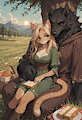
Those who checked any of my workflows know that i use the UltimateSDupscaler for my images. The node has it's quirks and settings, but what i wanted to point out in the first 2 images is the detail adjustment via denoise strength. Denoise is the setting that adjusts the current node's amount of influence over the image. This is true for all and any nodes. Noise refers to how much any given node can add it's own "noise" to the resulting image. Higher number means the node adds more of it's noise, lower number means it adds less (most commonly you see this interaction between LORA loaders and the Ksampler itself). The setting is similar to CFG scale in a broad sense, but noise is sitting at the end of the calculation and adjusts everything involving the image. Its the overall influence of any given node.
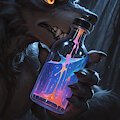
So before i write a book here on a single setting TL;DR: Image 1 has a denoise setting of 0.3 - (lower value -> stays closer to the original image) Image 2 has a denoise setting of 0.45 - (higher value -> allows USDU to overwrite more of the original)
You can tell the difference in detail for yourself. USDU recommends 0.45 as the maximum setting for denoising, but nothing is set in stone just like with the CFG scale. Test, experiment, create and have fun. ( ˘ ³˘)♥
Oh and the image prompt here was revolving on object_focus rather than letting the character have the scene, with the mentioned little dabbling in the splatter effect