Been bugging me for a while that i did not have a real way to test concepts and prompts across multiple models, so i spent a few hours on this centipede.
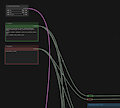
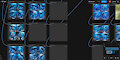
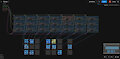
You will have to sadly download (i think) 2 node packs for it to work cause the default comfyui nodepacks do not provide the tools needed for this, but the TL;DR of the story is that as you can see in the pictures:
- You can type one single prompt in one single box
- Set one single resolution for all models
- Then the entire thing will proceed through as many models as you set/want to add, and the most important part:
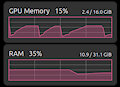
- The models will be unloaded after each 4 img generation, meaning that comfyui will not try to store 18 models in your memory, instantly choking your pc. It will load the model, do the model, unload the model.
Not entire sure if the site permits an upload like this, but if its a problem then i will provide actual example images to satisfy the "art need".
Hope it helps, and as always: If you need help with anything, just ask.
Keywords
ai generated
41,753,
ai
12,120,
ai assisted
2,926,
work
1,819,
comfyui
891,
help
809,
learning
403,
prompt
359,
workflowattached
86,
workflow
5
Details
Published:
2 weeks, 6 days ago
17 Oct 2026 16:17 CEST
Initial: cd6badcf5835c56eecab2f1908275cd0
Full Size: d08bf2c76c7943ad32acaea6577d9758
Large: 9a238e08b3bda9504e8072f765aa5b85
Small: 190e0243d739127497fad715167ec2d4
Stats
63 views
3 favorites
4 comments