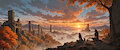
The theme of the day is ruins, which really just gave me the cravings to make a picturesque scenery, so lets find out how to make one:
This brings us to the model Xavier. One of my all time favorite models which inherited only the best from it's illustrous base in terms of background creation and scene setting. Shout-out to
who introduced me to this model. Checkout their page and give them some love if you like what you see. https://inkbunny.net/Pixvul
With our model being set, your first step will be to pick the proper resolution. Less height and more width to it. Illustrous handles higher resolutions and ratios well, so we go straight 2304x960 for the base image, and then jump to the prompt itself:
The foundation for this kind of image are 2 keywords: - very wide shot (alternatively the more common 'wide shot' -> environment. Lots of environment) - scenery (the default keyword for scene and environment focus)
The enhancer keywords for the setting are: - rule of thirds (once again to lower image symmetry) - depth of field (sets the foreground into focus and slowly blurs the background the farther it goes, giving the image a sensation of depth) - dappled sunlight (lastly, this prompt is less visible in the image and is always a LOT more effective on closeups, but it manages objects such as leaves getting in the way of light)
Lastly the flavor to the setting is: outdoors, (sunset), (ruins:1.2), mountains, autumn, mountainous horizon, fog, cloudy sky
As usual, the entire workflow is accessible and if you got any questions i will answer to the best of my knowledge. Have fun ( ˘ ³˘)♥